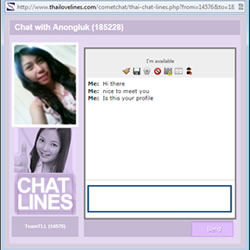
Talk one to one with Premium users online using Chat Lines
Take your time to find out more about how IM Chat Lines on ThaiLoveLines.com can open up your social life.
You access it from various list menus, the most common one being 'Whose Online Now' in the 'This Session'panel in your Members Control Centre. You must be a Premium Member and the other members must also be a Premium Member.
This is how it works:
- Upgrade to Premium which starts at just $19.99 for one month.
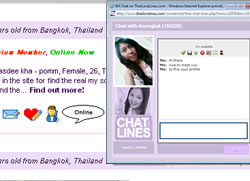
- When you see the 'I'm Online/Online' balloon, simply click. If your computer needs a new version of Javascript, you will be shown how to get it. However over 90% of computers use Javascript. You can test the facility before you upgrade but you will see the 'Upgrade to Premium' appear within the Chat box.
- It is important that you wait for the other person to connect with you on the other side. You must type a message into the box to activate the connection to open on the other members side.
- Chat Lines on ThaiLoveLines allows you to chat one to one with the other member, to see their photo and to click a button to view their profile as you are talking with them.
- Who is Online: In your Members Control Centre you will find many links to a live list of all profiles currently online. You can initiate live IM Chat with any member here by clicking the flasing IM bubble. Both Standard members and Premium members can access these lists.
- Chat Online: This list of online members is more selective and can only be accessed by Premium members. These members are now available for Live chat conversations.
- IM Alerts: If you connect with a Standard Member, the system will tell you that it was unable to open that member's window. A message will appear on the Standard Member's computer explaining that they should upgrade to Premium to use the IM Chat Lines facility. If they do not receive this alert, they will be e-mailed internally and externally that you tried to chat with them.
- Chat Communications: You can connect quite easily to IM on ThaiLoveLines and have secure chat sessions with all other members online. This is The system offers high quality monitored connections. There is also a built in translation service. This has an EN button for English or a TH button for Thai. Please note that adult content is strictly prohibited and will be detected by our security systems.
This dating tool is best used with the online favourites list on ThaiLoveLines as a Premium Member so that you can develop a 'golden list' of key members with whom you are developing a close relationship. |


 Realtime Chat under secure conditions, no adult content